
Stream quality and delivery: HLS, MP3 and mounts
How your audio reaches listeners — adaptive HLS over CDN and universal MP3/Icecast — plus stream mounts, codecs, bitrates and the quality picker.
Once you're on air, the same audio can travel to listeners two very different ways — and Nobex sends it both ways at once, on every plan. This guide explains the two delivery formats, how stream mounts let you offer quality variants, and which link to share where.
Two formats, delivered together
Every station broadcasts on both formats simultaneously — you never pick one and lose the other:
- HLS over CDN — adaptive AAC delivered from a global edge cache. It's what our web player, embed widget and mobile apps use, and it scales cleanly from ten listeners to a hundred thousand. This is your listen link for websites, apps and embeds.
- The origin stream — the source the CDN pulls from. It also serves as the player's automatic behind-the-scenes fallback if the CDN path ever hiccups, so your station never goes silent.
| HLS over CDN | MP3 / Icecast | |
|---|---|---|
| Best for | Your site, app, embeds | VLC, hardware radios, TuneIn, cars |
| Codec | AAC (adaptive-ready) | MP3 (up to 320 kbps) |
| Global CDN delivery | Yes — edge-cached worldwide | Direct from the server |
| Modern browsers | Yes | Yes |
| Legacy players | Some | Universal |
You don't have to choose
Both are always live. The listener player picks the fast, CDN-backed HLS path automatically and never exposes the choice — your job is just to hand out the right link for the surface, which we cover below.
What a stream mount is
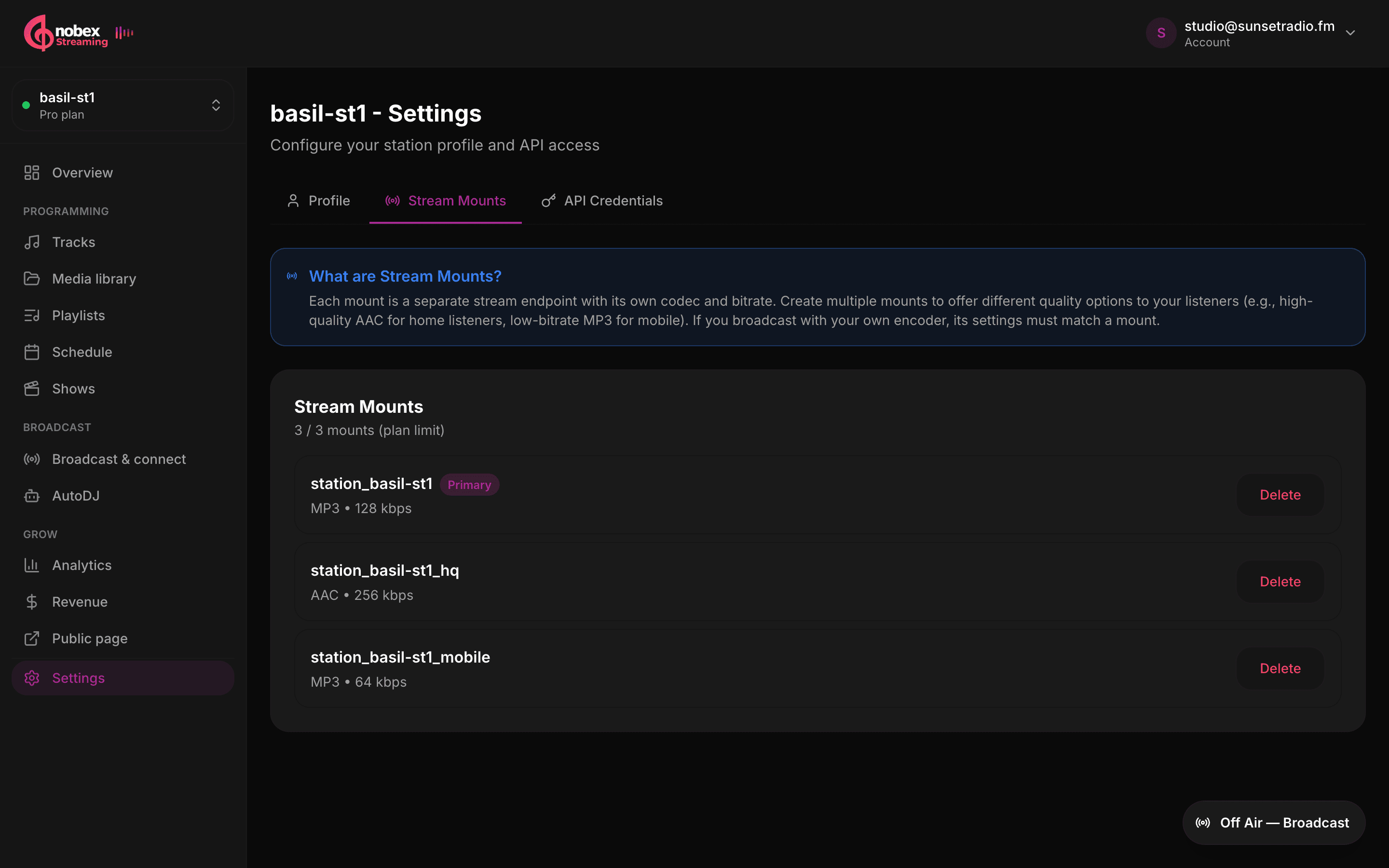
A mount is a single stream endpoint with its own codec and bitrate — think of each one as a distinct quality of your station. You configure mounts in Settings → Stream Mounts. Creating more than one lets you offer choices: a high-quality AAC stream for home listeners and a low-bitrate MP3 for people on mobile data, for example.
Two codecs are available, on every plan. They behave differently, so pick to match the job:
- MP3 — universal compatibility, 32–320 kbps. Reach for it when anything might play the stream, including hardware radios and car stereos.
- AAC — better sound than MP3 at the same bitrate, 32–320 kbps. Great for a quality flagship mount on modern players.
You rarely need a dedicated low-bitrate mount for listeners on patchy mobile data: the adaptive stream above already publishes an AAC ladder and lets each listener's player drop to a lower rung on its own.
How many mounts you get
The number of mounts you can create is capped by your plan — the Stream Mounts manager shows your usage as “used / limit.” Higher plans allow more mounts and higher bitrates.
Adding a mount
- 1Open Settings → Stream Mounts and click Add Mount.
- 2Give it a Mount Name (an endpoint path — a starter one is pre-filled for you).
- 3Choose a Codec — MP3 or AAC.
- 4Pick a Bitrate — up to your plan's ceiling (128, 256 or 320 kbps).
- 5Optionally tick Set as primary mount to make it your station's default, then Create Mount.
Encoder settings must match a mount
If you broadcast with your own encoder (OBS, BUTT, Mixxx, the desktop Agent, and so on), its codec and bitrate must match one of your configured mounts. A source whose settings don't line up with a mount (within about 10%) is automatically disconnected after a few seconds. Set the mount up first, then point your encoder at it.
Automatic transcode variants
Beyond the mounts you create by hand, Nobex can generate extra quality variants for you on the server, depending on your plan:
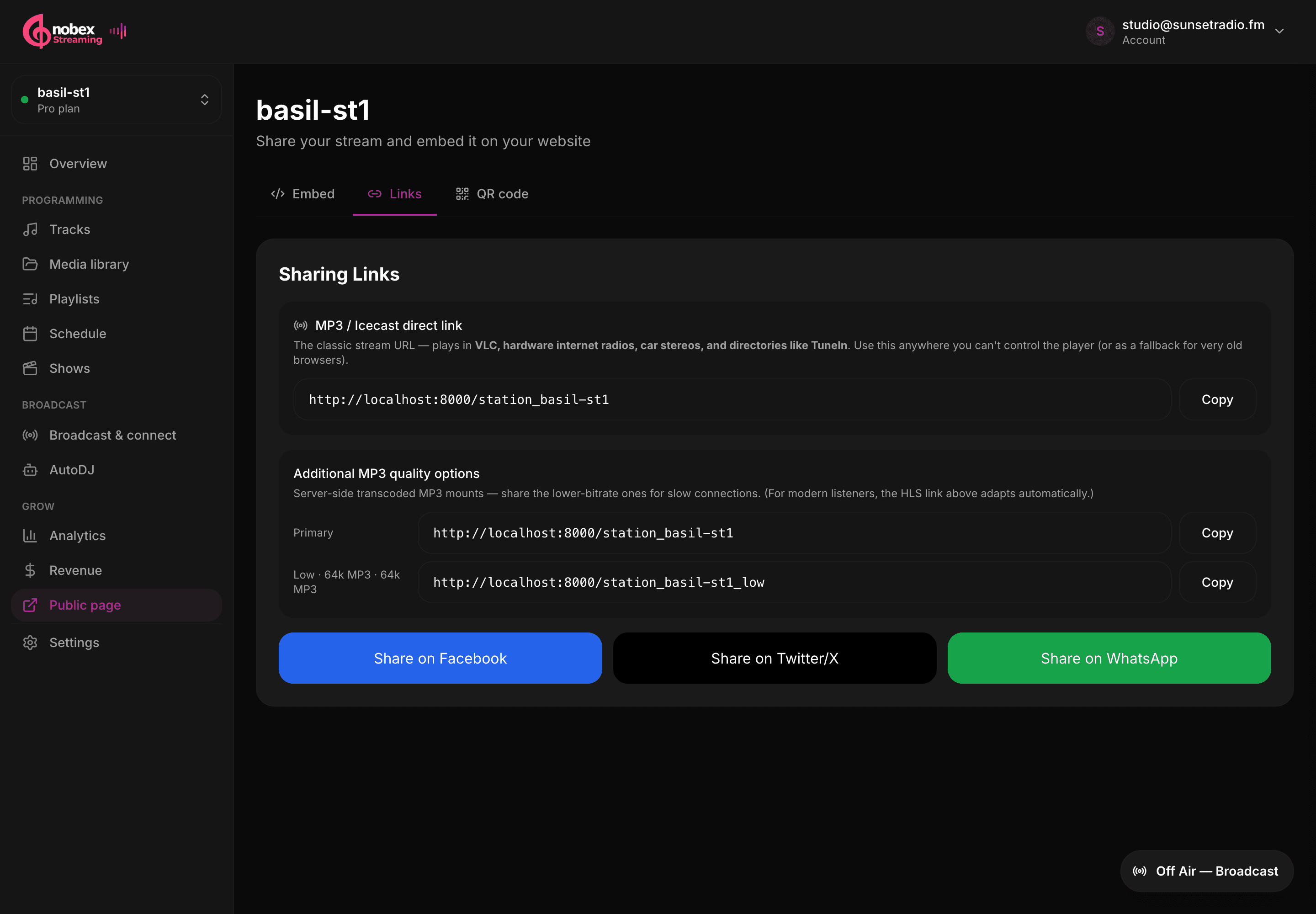
- Pro adds a low 64 kbps MP3 stream — a lightweight option for listeners on slow connections.
- Business and above additionally add a 48 kbps AAC mobile stream tuned for phones on cellular data.
Note
These transcode relays pull from your primary stream and are not counted as listeners against your plan — they exist purely to widen the quality options your audience can pick from.
The listener quality picker
When your station offers more than one quality, the player shows a small quality control so a listener can pin a specific stream — handy for someone who wants to force the low-bitrate option on mobile data, or the highest-quality mount at home. With a single quality, the control simply stays hidden and playback just works.
Getting it right
Offer a high-quality mount and a low-bitrate one
A common, effective setup is a quality AAC mount (say 128 kbps) for home and desktop listeners plus a low-bitrate MP3 mount (48–64 kbps) for people on cellular data or an old hardware radio. The adaptive stream already handles weak connections on its own, so treat these extra mounts as a convenience for listeners who want to pin a specific quality.
Share the right link for the surface
Share your listen page in social posts, bios and anywhere people click links — it opens a branded player in any browser. Use the HLS / CDN stream link in your own website, app or any HTML5 player — it adapts and scales globally. Need a plain MP3 URL for a hardware radio, a car stereo or a directory like TuneIn? Pro and Business plans include an MP3 direct link — copy it from the same Sharing panel.
Where to go next
- Hand these links out well in Your public page, embed player and sharing.
- Point an external encoder at a mount in the desktop Agent and DJ software guide.
- See which codecs, bitrates and mount counts your plan includes in Plans and billing.
Keep reading
Ready to put this into practice?
Start a free trial and be on air in under five minutes — no software to install.
Start streaming free