
Plans, billing and managing your subscription
Pick the right plan, understand the free trial and overage cap, and manage everything — upgrades, pauses, streams, payment methods and invoices — from one Subscription page.
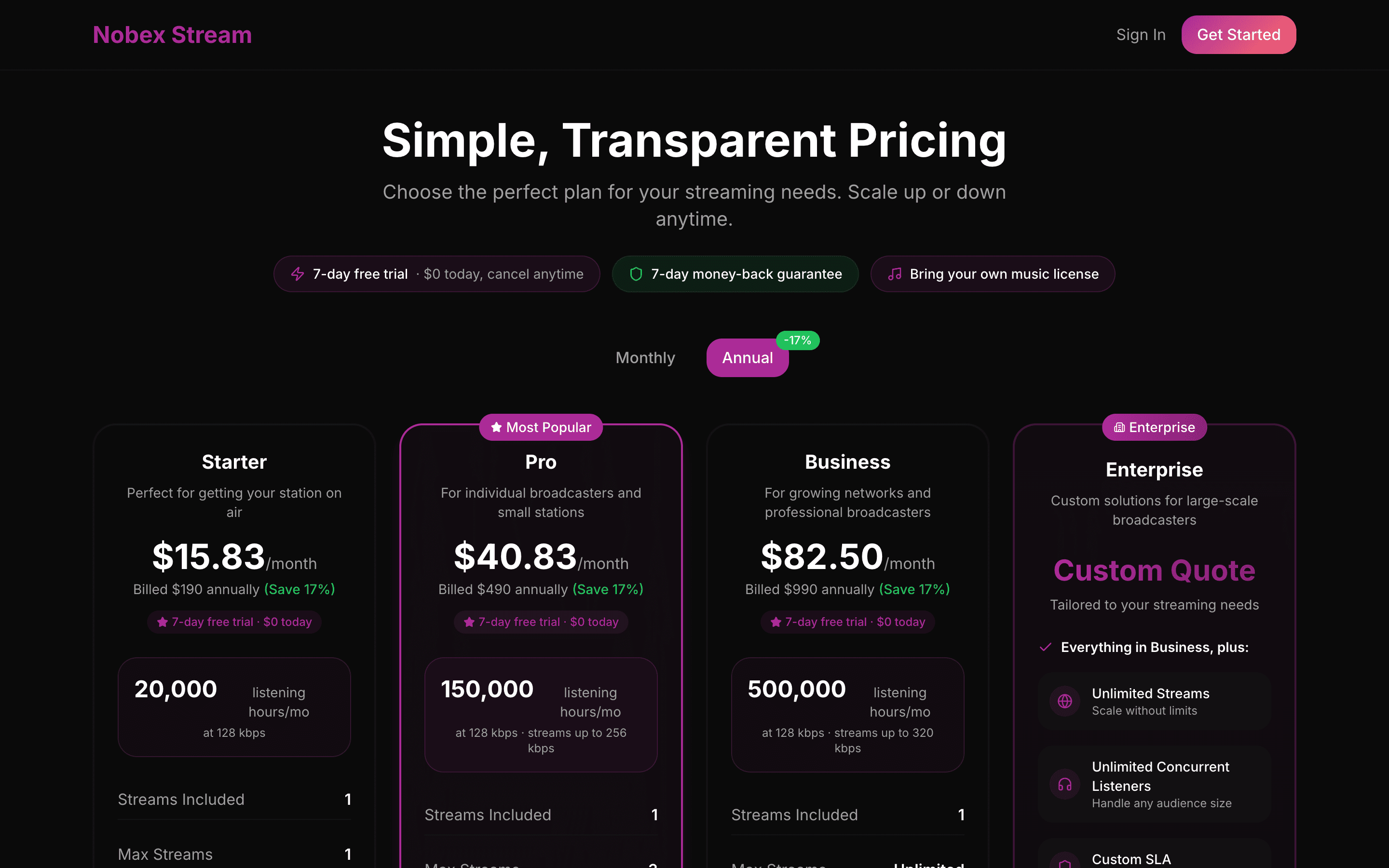
Nobex Streaming plans scale with your audience, not your patience. This guide covers the four plans and what actually differs between them, how the free trial works, and how to change plan, pause, add streams and keep your billing tidy — all from one page.
1. The plans
There are four tiers — Starter, Pro, Business and Enterprise. Starter is a complete, properly-delivered radio station: cloud automation, live from your phone or browser, and CDN delivery. Moving up buys you two things — more room to grow, and more you can do with the station.
| What differs | As you move up |
|---|---|
| Listening hours | A larger monthly allowance — the number that actually sizes your plan. |
| Concurrent listeners | The cap on simultaneous listeners rises with each plan. |
| Bitrates | A higher maximum bitrate — 128, 256 then 320 kbps. MP3 and AAC are on every plan, so the codecs never change. |
| Stream mounts | More quality variants (mounts) you can run at once. |
| Show recording | Record your shows automatically — from Pro. Unattended scheduled recording windows are Business. |
| Podcast publishing | Turn recordings into a podcast feed — from Pro. |
| Smart speaker listing | Validated details for getting on Alexa — from Pro. |
| Smart scheduling | Program a weekly clock of shows and blocks — from Pro. |
| MP3 direct link | The universal stream URL for hardware radios and directories — from Pro. |
| Analytics | Historical trends plus geographic, device and retention breakdowns — from Pro. |
| Geo-blocking | Restrict listening by country for rights reasons — from Business. |
Enterprise is custom — for large-scale operations that need bespoke limits and dedicated support. Compare everything live on the pricing page.
Upgrade before you hit the ceiling
The limit that bites first is usually concurrent listeners — once you hit the cap, new listeners can't connect. If a show or a feature is about to grow your audience, move up a plan first so nobody gets a busy signal.
2. Country pricing and annual savings
Prices are country-tiered, so what you see is localized to your region and currency. Use the country selector on the pricing page to check your local rate.
Every plan bills monthly or annually. Switch the toggle to Annual to save 17% versus paying month to month — the simplest discount available and worth it the moment you know you're staying.
Running more than one station?
The stream calculator on the pricing and checkout pages estimates the cost of multiple streams on one account, including the additional-stream discount. Handy before you commit.
3. The free trial
New accounts get a 7-day free trial — a real, on-air station, not a demo. The trial runs in one of two modes:
- No credit card — start instantly; streaming simply stops when the trial expires unless you subscribe.
- Card required — a paid-plan trial ($0 today) on any self-serve plan, which you can cancel anytime before it converts.
Either way, Nobex emails you a reminder roughly two days before the trial ends, so nothing lapses by surprise.
4. Manage your subscription
Everything after signup happens on Dashboard → Subscription. The top card shows your plan, status, current period and next billing amount; below it, tabs for Overview, Payment Methods and Invoices.
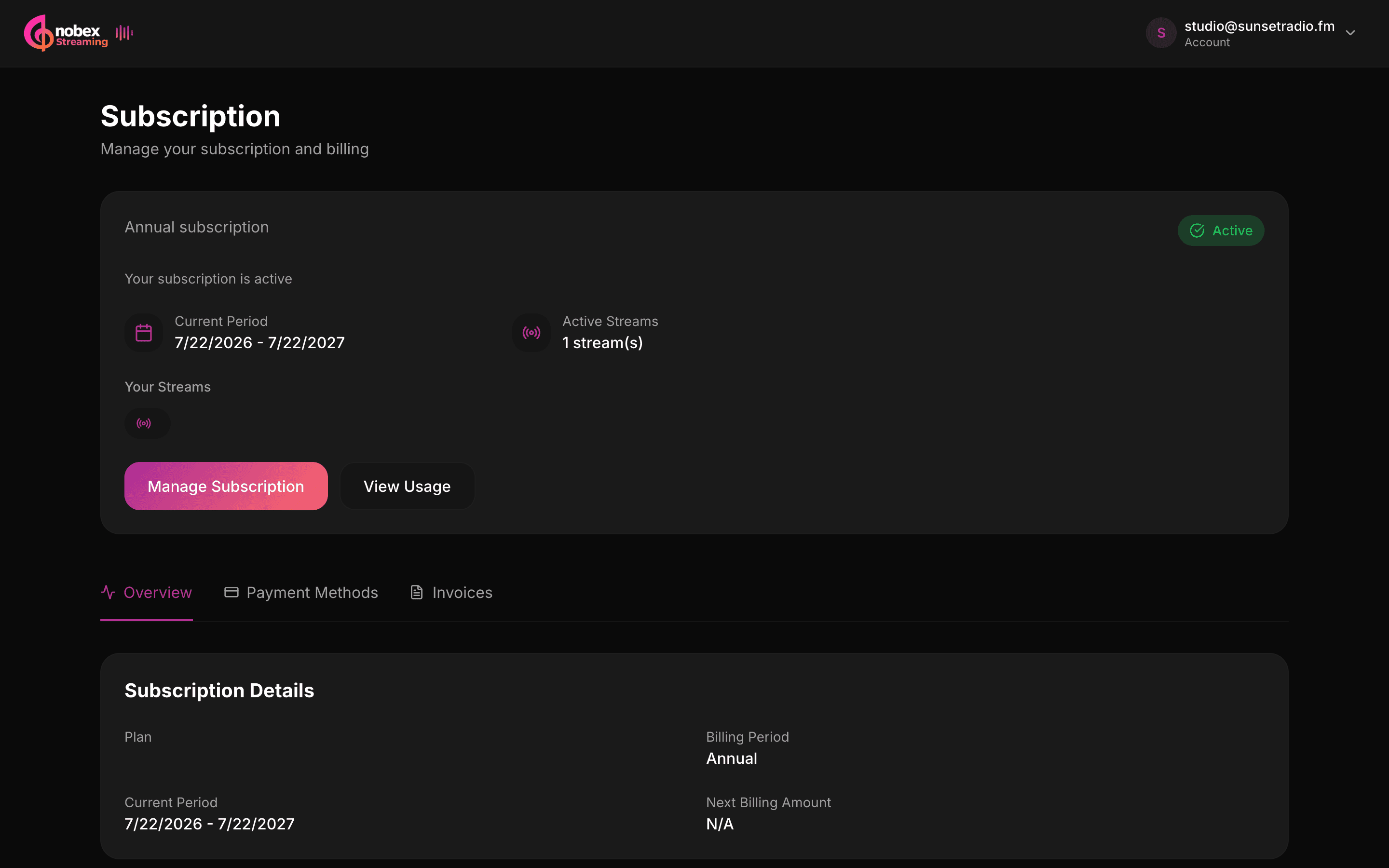
Changing plan
- Upgrade — takes effect immediately, and you're charged a prorated amount for the rest of the period.
- Downgrade — takes effect at the end of your current billing period, so you keep what you paid for.
- Pause / resume — pause billing when you're off air (your streams stop until you resume).
- Cancel / reactivate — cancel and keep access until the period ends; reactivate anytime before then.
- Add / remove streams — manage the streams attached to your subscription; add-ons can be removed from the Overview tab.
5. The overage cap
If you go past your plan's bandwidth or listener allowance, usage above the limit is billed as overage — $0.10/GB of bandwidth and $0.01 per listener-hour. Those rates sit close to what your plan already works out at per gigabyte, so a busy month costs a little more rather than a lot: the job of an overage rate is to make the next plan up the cheaper choice, not to punish you for growing. The Overview tab shows a projected overage cost based on your current pace.
To stay in control, set a Monthly overage cap — a hard ceiling on what you can be charged for usage above your plan. Enter an amount and Save, or leave it blank for no cap.
Set an overage cap on day one
A cap turns a surprise viral spike into a known, bounded cost. Set a number you're comfortable with now — you can always raise it — so a great day never becomes a scary invoice.
6. Usage alerts
You don't have to watch the meters. Nobex emails you automatically when you reach 80% and again at 95% of your bandwidth or listener limits — early enough to upgrade or adjust before you hit the ceiling. The same meters live on your Overview tab and your station's billing view.
7. Payment methods and invoices
On the Payment Methods tab, add or update cards — they're tokenized by the payment gateway, so full card numbers never touch Nobex. On the Invoices tab you'll find your complete billing history with links to each invoice for your records or accountant.
Keep a card on file
Even on an annual plan, a valid payment method prevents overage charges or a renewal from failing. If a payment ever fails, your subscription shows Past Due — update the card to restore it.
Quick recap
- Pick a plan by concurrent listeners first; upgrade before you hit the cap.
- Choose annual to save 17% once you're committed.
- Set a monthly overage cap so usage spikes stay bounded.
- Watch for the 80% / 95% emails and act early.
Keep reading
Ready to put this into practice?
Start a free trial and be on air in under five minutes — no software to install.
Start streaming free